Administer configuration elements
Configuration elements pertaining to an offer are administered in the expandable section of Offer detail.
Use the Configuration elements section to: |
|
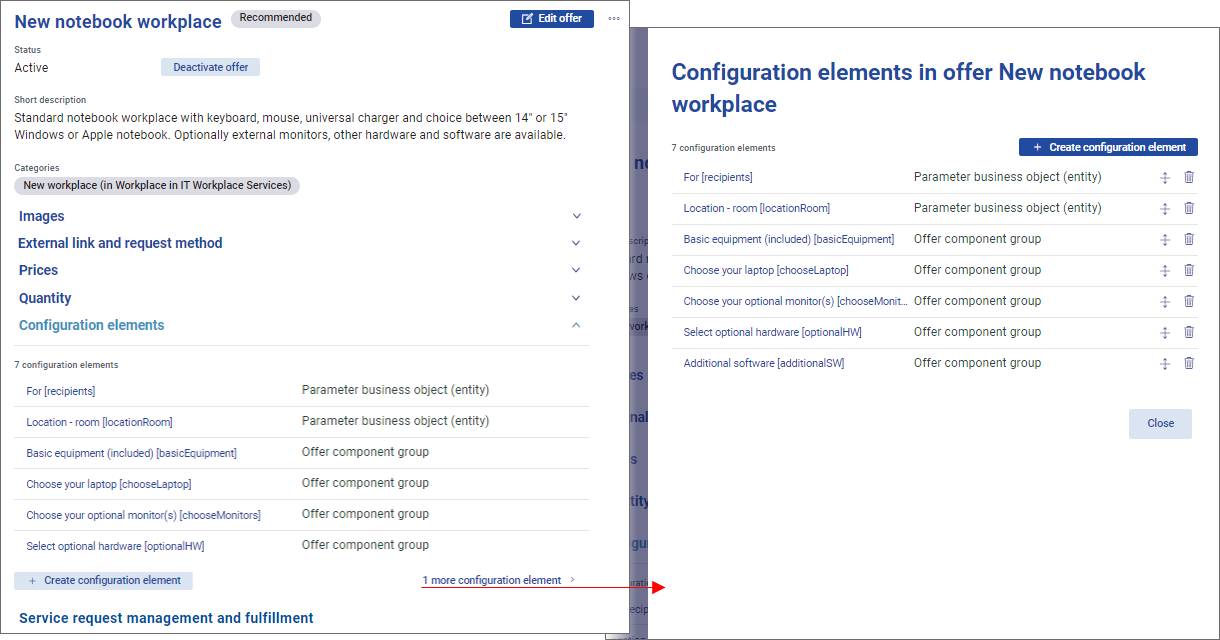
Elements administration
To administer configuration elements of an offer:
Open the offer in offer detail. Configuration elements can be administered in either mode.
Expand the section.
The section lists configuration elements of the offer in the order in which they are displayed in Offer detail for the end user. A maximum of 6 elements are displayed directly in the section. If the offer contains more than 6 configuration elements, the list needs to be opened in a separate dialog by clicking the link at the bottom of the list.
In the full list you can:
Drag the icons at the right of the list to change the order of configuration elements.
Use the icons at the right of the list to delete individual configuration elements.
Click the configuration element name to it .
Click the button to open a dialog for new element creation.
Configuration elements administration performed in the list is saved automatically, it is not necessary to update the offer to save the changes.