Possible Values
Use the possible values functionality to limit the set of business objects offered as parameter values by applying a pre-defined filter. Note that the filters must first be created in USU Service Management.
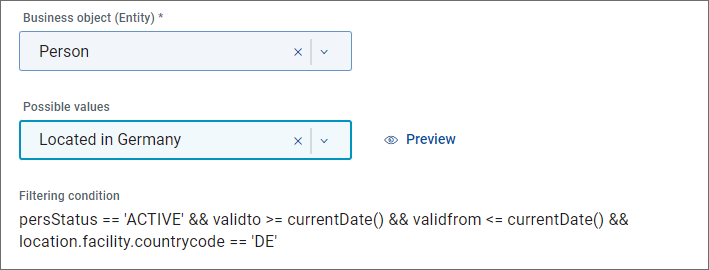
Possible values | Use the Possible values field to assign one of the pre-defined filters available for the entity selected in the Business object field. In the example image above, USM business object Person is used as the source of parameter values. The person responsible for data preparation on the USM side may have defined filters limiting the set of returned objects according to a suitable filtering condition. Names of these filters (also specified in USM) are presented for selection in the Possible values dropdown. , Filter named Located in Germany has been selected in the example. |
Preview | Use the link to open a dialog providing a preview of values resulting from the selected filtering. Preview is limited to the maximum of 200 first values. Note that due to varying data access permissions, the set of values presented to the administrator may differ from the sets available to individual users. |
Filtering condition | Read-only field displaying the condition which defines the filter. In the example image above, Person business objects are filtered to currently valid active persons whose facility country code equals DE. |
End user perspective
As a result, the user's choice of business object parameter values will be limited only to a set of relevant values defined by the filtering condition.