Localize configuration elements
Individual configuration elements belonging to an offer can also be localized. You can localize offer parameters as well as component groups and components. The prerequisites listed in the Localize an offer topic also apply here.
To localize an offer parameter:
Open the offer in offer detail (read mode or edit mode) and expand the Configuration elements section.
Click the parameter you want to localize. The parameter opens in the Edit configuration element dialog.
Only fields which contain some text in the main language will be offered for translation. Before proceeding, make sure that all text fields you want to translate are filled in.
Click the link at the right top of the dialog. A translations editor of the USU Localization Manager opens in a new browser tab, and you are redirected to this tab.
The translations editor displays all attributes of the parameter which are translatable and are filled in in the main language. (The only exception is the 'Internal name' attribute, which does not get translated.) Specify the translations.
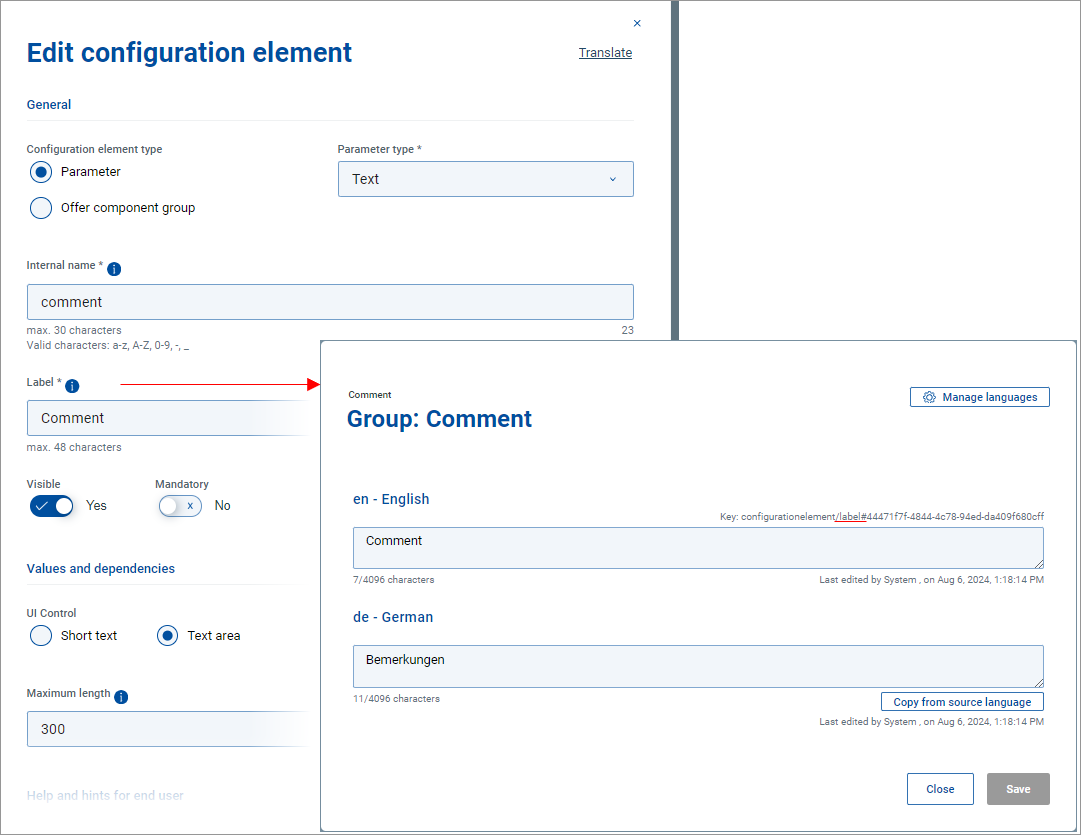
The translations editor containing translatable attributes which have a filled in value in the main language.
Click Save to store the changes. A popup message will confirm that the translations have successfully been updated. You can close the browser tab.
The translations are saved both in the USU Localization Manager and the USU Shop database.
Back in the Shop, you need to reload the page for the changes to take effect. You are notified about the need to reload the page by a "New or changed translations" message temporarily displayed in the offer detail tab.
Note, however, that no matter what language is currently selected for the user interface, attribute values in Shop for the administrator are always displayed in the main language. (When using the editor with interface language other than the main language, an "editing language" message (e.g. Bearbeitungssparche: Englisch) at the top of the editor reminds you of this fact.)
The new translations can be checked in Shop for the end user switched to the respective language.
To localize a component group:
An offer component group is yet another configuration element and its localization process is exactly the same as described for offer parameter (see above).
For a component group, only the Label attribute can be translated.
To localize a component:
Offer component localization is done in the same way as offer parameters and component groups, the only difference being its starting point.
Open the offer in offer detail (read mode or edit mode) and expand the Configuration elements section.
Click the component group which contains the component you want to localize. The group opens in the Edit configuration element dialog.
In the edit dialog, go to the Offer components section and click the component to be localized. The component opens in the Edit offer component dialog.
Click the link at the right top of the Edit offer component dialog and proceed analogically to localizing an offer parameter or component group.