My requests filter
Clicking Show filter in the My requests page opens the My requests filter dialog. Use it to specify filtering of the requests list.
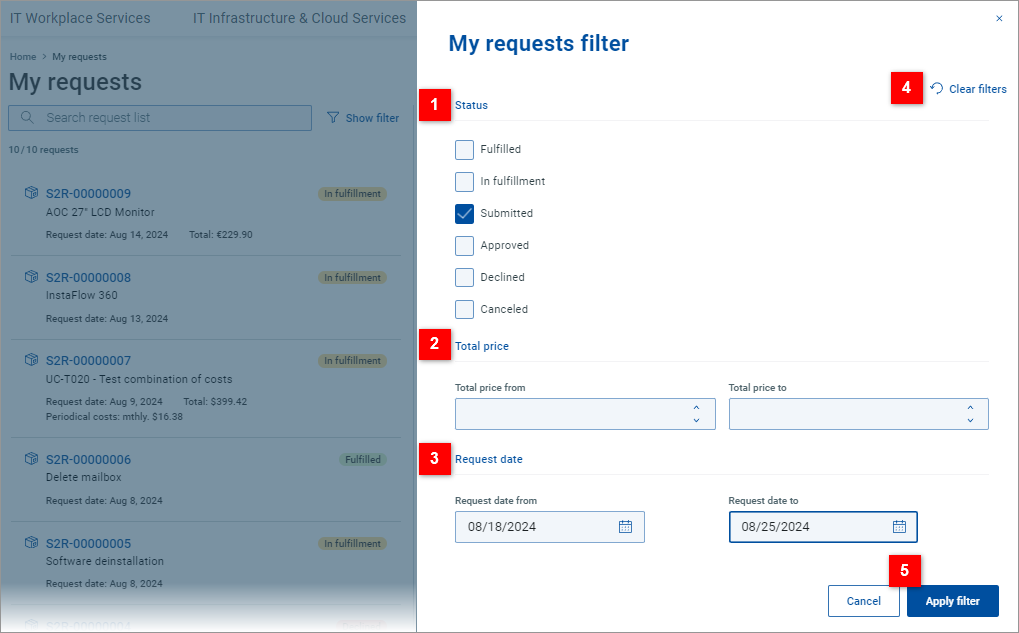
| Filter the list by request status. Multiple statuses can be selected. |
| Filter the list by total request price. A price range can be specified. |
| Filter the list by request creation date. A date interval can be specified. |
| Click Clear filters to clear the current filter criteria. The dialog remains open and can be used to specify new criteria. Note: To quickly clear the filter and immediately get the unfiltered list, use Reset all filters at the top of the requests list. |
| Click Apply filter to close the dialog and apply the specified filer criteria. Click Cancel to close the dialog without applying the filter. The filter criteria will remain the same as before opening the dialog. |


